Unit and module catalogs
Create parametric room, unit, and module types with configurable dimensions, finishes, openings, and connection rules.
Modular Housing Workflow System
ArchiLabs helps modular housing teams encode unit types, module constraints, MEP connections, sheets, annotations, documentation, and manufacturing handoffs as repeatable workflows.
ArchiLabs Desktop in action
Explore the same drawing-to-model workflow with a public facility plan and an equipment specification. These examples show native Revit modeling and refinement in conversation.
Turn architectural plans into walls, rooms, doors, and roofs. Refine the details in conversation.
Starting from public architectural plans, Desktop builds a native Revit model. The edit includes the initial request and the follow-up corrections used to refine the building, followed by exterior, roof-off, and office views of the corrected result. Waiting periods are shortened; accelerated segments are labeled in the video.
Workflow system
Each workflow combines smart components, AI-assisted recipe generation, deterministic validation, sheet and annotation automation, and exports that fit the tools your team already uses.
Create parametric room, unit, and module types with configurable dimensions, finishes, openings, and connection rules.
Validate adjacency, corridor, riser, shaft, and MEP connection assumptions as modules are arranged.
Generate structured outputs for review packages, sheets, annotations, schedules, model exports, and downstream fabrication workflows.
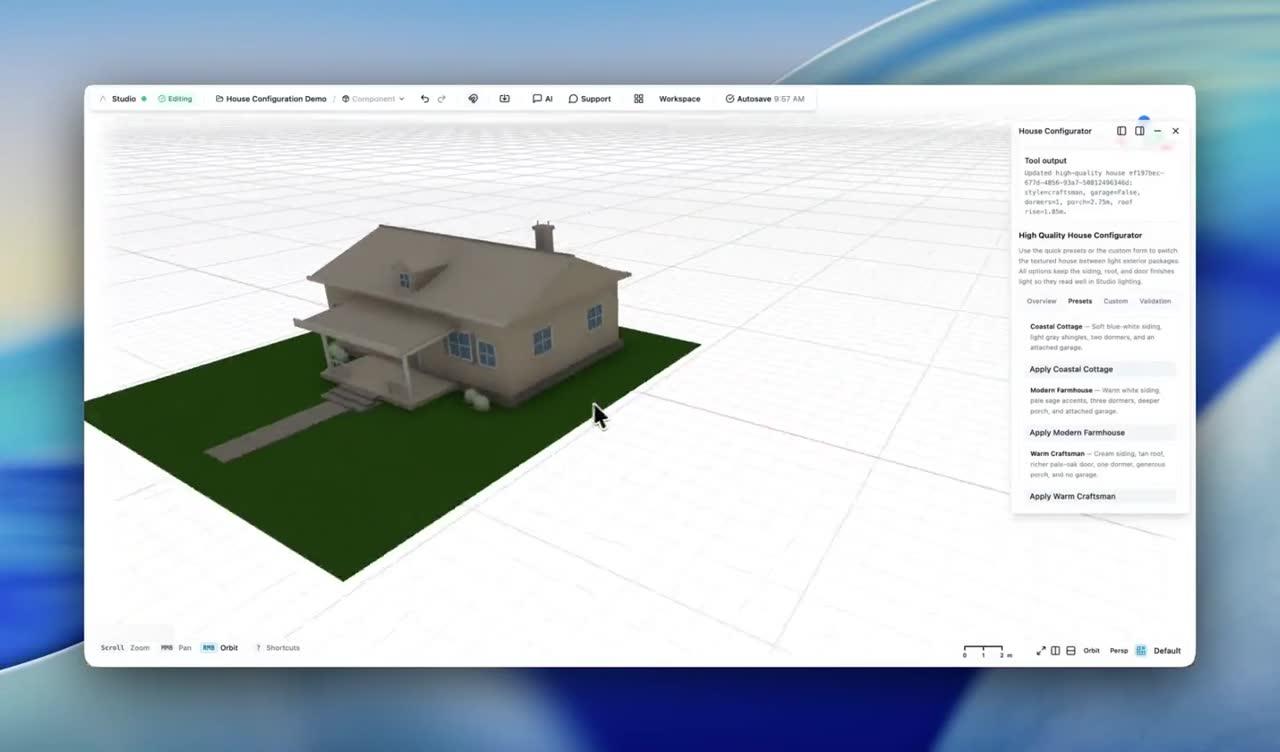
House configurator demo
Use a configurator experience to change dormer count, roof pitch, siding colors, roof colors, and other options while the house regenerates.
The same pattern works across each workflow: define intent, generate the model and documentation, validate the result, and hand it off cleanly.
Model repeatable units, rooms, modules, service zones, and constraints as smart components.
Use saved workflows to place, stack, mirror, and adjust modules while preserving rule-based constraints.
Surface layout, connection, corridor, and documentation issues before design changes reach production teams.
Produce sheets, annotations, model exports, schedules, reports, and structured handoff data for coordination or manufacturing review.
Workflow checks are structured and auditable. They help teams find missing information, inconsistent assumptions, and likely issues before sheets, annotations, reports, or model exports move downstream.
End-to-end platform
ArchiLabs Desktop brings AI into Revit, AutoCAD, and connected project tools. ArchiLabs Studio provides a browser workspace for design and reusable components. Together, they help teams carry drawings, models, and project context into the next stage of work.
The goal is to make repeatable design and documentation logic reusable across projects while still fitting into the BIM and CAD stack your team already has.
More workflows
MEP Workflow System
Automate MEP routing, sizing, coordination, sheets, annotations, schedules, and review workflows with ArchiLabs.
Data Center Design Automation
Automate rack layouts, power and cooling coordination, cable routing, specifications, RFIs, BIM documentation, validation, and DCIM-ready handoff.
Homebuilder CPQ Workflow System
Create 3D CPQ configurator workflows for production and semi-custom homebuilders with plan, elevation, option package, pricing, validation, and construction drawing outputs.
Fire Protection Workflow System
Coordinate fire protection workflows for sprinkler layouts, pipe routing, risers, alarm pathways, calculations, schedules, checks, exports, and revision comparison.
Whether you're planning a new data hall, modernizing a live facility, coordinating critical systems, or connecting design data to operations, we'd love to hear what your team wants to automate. We also continue to support MEP, production homebuilding, modular housing, fire protection, and embedded design workflows.
Talk to the team
See Desktop and Studio in a walkthrough tailored to your team’s workflow.
Pilot a workflow
Start with one high-value automation and connect it to your current delivery process.
Technical questions
DCIM, CFD, BIM, document automation, APIs, and custom components — ask us anything.